Friday, 27 January 2017

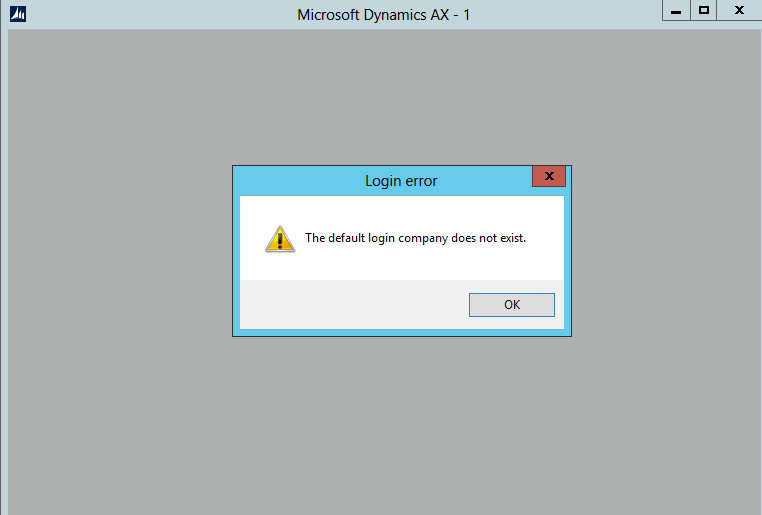
Error : The default login company does not exist.

Hi guys,

Today i have installed AX 2012 R3 in my system, and create one legal entry and default that legal entities , but unfortunately i have deleted my legal entity without changing default company to previous one. Because of that i am getting this error , whenever i am trying to open AX.


Solution : solution is very simple, you have to make change in AX configuration utility.

Server manager -> tool - >microsoft dynamic Ax 2012 Configuration

Select your configuration then -> general -> fill company name -> DAT(which is default company name) -> then save as you configuration.


Thanks

Wednesday, 25 January 2017


Error : Error Message: Assembly containing type Microsoft.Dynamics.AX.Framework.Tools.DMF.ServiceProxy.DmfEntityProxy is not referenced.
Object 'CLRObject' could not be created


Today while implementing Ax , i came across with is error when i want to use data import export framework module and open data import/export framework parameter.


Then i google it, i found that i have not install these,
[image%255B7%255D.png]

Then i install it from AX setup and after stop the services,

reference from:

https://community.dynamics.com/ax/b/axaptavsme/archive/2015/02/14/dixf-error-assembly-containing-type-microsoft-dynamics-ax-framework-tools-dmf-serviceproxy-dmfentityproxy-is-not-referenced


Thanks,

Tuesday, 24 January 2017

The Specified client configuration does not contain valid WCF setting


Error : The Specified client configuration does not contain valid WCF setting.


Solution :  go to control panel find Administrative tool -> find Microsoft dynamic AX 2012 configuration


Now select your configuration -> connection -> click on Refresh Configuration
When it get refresh then select configure Services it will warning -> read it then OK


Then File -> save then close this window


Now go to manage - > then again SAVE as your configuration for update that you change or refresh.

Then APPLY and OK  -> open that saved .Exc


Thanks

Friday, 9 December 2016

AOS dependency service or group failed to start

AOS dependency service or group failed to start

Error : windows could not start ax object server service on local computer. Error 1068: the 

dependency service or group failed to start.


Solution : first check sql server and sql server agent services are running check if it is running.
sql server 2012 with error 17051
sometime most of the people come across with this error while starting the service of sql server

Because of this error you can not open Microsoft Ax. Because  when the database is not opening, then AX is also not support.
Solution:1.      Open the event viewer from server manager -> tools


Then select your error the same error which is highlighted saying Sql server evaluation period has     expired. Because of absence of product key , without product key it is useful for only 180 days
1.      In this case you have to maintain sql server again.
2.      So go to sql server installation center -> click on maintenance link then-> edition upgrade

Do next next then it will come on product key page then use any key according to your requerment . I have chosen this yellow mark key.
MS SQL SERVER 2012 SERIAL NUMBER

MICROSOFT SQL SERVER 2012 DEVELOPER
YQWTX-G8T4R-QW4XX-BVH62-GP68Y

MICROSOFT SQL SERVER 2012 ENTERPRISE SERVER/CAL EDITION
748RB-X4T6B-MRM7V-RTVFF-CHC8H

MICROSOFT SQL SERVER 2012 STANDARD
YFC4R-BRRWB-TVP9Y-6WJQ9-MCJQ7


MICROSOFT SQL SERVER 2012 WEB
FB3W8-YRXDP-G8F8F-C46KG-Q998F

MICROSOFT SQL SERVER 2012 ENTERPRISE CORE
FH666-Y346V-7XFQ3-V69JM-RHW28

MICROSOFT SQL SERVER 2012 BUSINESS INTELLIGENCE
HRV7T-DVTM4-V6XG8-P36T4-MRYT6
On the Select Instance page, select the SQL Instance that you want to fix and Click next. It will take some time and finally you will see a final window and click Upgrade:
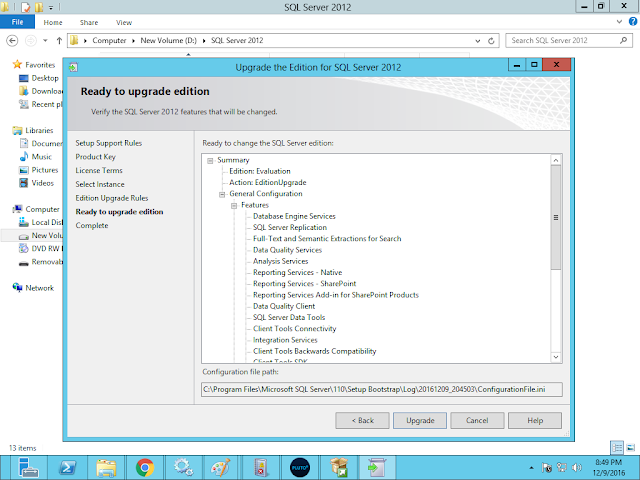
After completed this .
Select sql server configuration manager

 
Then start sql server manually then start service again then
Then start Microsoft dynamic AX 2012 service again
Now use open AX J

Note: if you came across with is error while starting sql server from sql server configuration manager
 

Then sql did not accept product key, do it again

once the sql server service is running you can run AOS and oprn AX


Thanks 


Wednesday, 16 November 2016


How to convert AX to Excel using class x++


this is very easy example to learn that how to use excel class.
first need to create excel in your destination, and put the path in the bold letters. and run it .

static void AxtoExcel(Args _args)
{
    SysExcelApplication      sysExcelApplication;  //this is class
    SysExcelWorkBooks        sysExcelWorkBooks;    //this is class
    SysExcelWorkBook         sysExcelWorkBook;       //this is class
    SysExcelWorkSheets       sysExcelWorkSheets;      //this is class
    SysExcelWorkSheet        sysExcelWorkSheet;       //this is class
    SysExcelRange            sysExcelRange;           //this is class
    CustTable                custTable;
    int                      row = 1;
    str                      filename;
    ;

    // name of the file

    filename = "C:\\Users\akshay\Desktop\fa.xlsx";
    sysExcelApplication = sysExcelApplication::construct();


    // create excel workbook and worksheet
    sysExcelWorkBooks =  sysExcelApplication.workbooks();
    sysExcelWorkBook  =  sysExcelWorkBooks.add();

    SysExcelWorkSheets = sysExcelApplication.worksheets();
    SysExcelWorkSheet  = SysExcelWorkSheets.itemFromNum(1);

    //excel columns captions

    SysExcelWorkSheet.cells().item(row,1).value("Account");
    SysExcelWorkSheet.cells().item(row,2).value("Name");
    row++;

    //fill the custtable to excell

    while select custtable
    {
        if(row == 20) // this means to get only 20 row
        break;

        SysExcelWorkSheet.cells().item(row,1).value(custtable.AccountNum);
        SysExcelWorkSheet.cells().item(row,2).value(custtable.Name);
        row++;
        }

//Check whether the document already exists

   if(WinApi::fileExists(fileName))
      WinApi::deleteFile(fileName);

   //Save Excel document
   sysExcelWorkBook.saveAs(fileName);

   //Open Excel document
   sysExcelApplication.visible(true);
   //Close Excel
   //xlsApplication.quit();
   //xlsApplication.finalize();
}


Thanks

Akshay


Add true and false image on your form


Add true and false image on your form


Today i got little improvement. There i have to check qty is greater then another qty.
If it true then print right image or if false then print cross image front of qty field.

Let do this with minimum code.

  1.  First add window control in your form.
  2. Fill the properties like this


4. Now the right code in qualitycheckline table. Mathod.


display inventtestimage resultimage()
{
#resAppl
real total;
;
total = (this.EndQty /  minOne(this.qty())) * 100 ;
if(total < 10)
 return #Image_OK;

return #Image_NotOk;
}


Thanks

Akshay

Tuesday, 15 November 2016


Calculating code Execution time

This code is used to measure the code execution in millisecond and then convert in second.
Try to put this code in your code that you want to mesure.

public void GetExecutiontime()
{
int start;
int end;
int milliseconds;
real seconds;

;
start = winAPI::getTickCount();
sleep(1000);
end = winapi::getTickCount();
milliseconds = end - start;

seconds = milliseconds / 1000;
info(strfmt("total seconds - %1", seconds));
}


I put this code in my class then call this mathod in run mathod.

If you want to run this code in job then run .


Thanks


Akshay