Wednesday, 4 April 2018


Filter in form by value.


vendopentrans-> DS-> vendtransopen -> init

public void init()
{
    QueryBuildDataSource qbds;
    QueryBuildRange qbr;
    super();


    qbds = this.query().dataSourceTable(tableNum(VendTransOpen));
    qbds.sortClear();
    qbds.addSortField(fieldNum(VendTransOpen, Aks_OnHold));
    qbr = SysQuery::findOrCreateRange(qbds, fieldNum(VendTransOpen, Aks_OnHold));
    qbr.value(queryValue('No'));

}

Thursday, 15 February 2018

Send Email to Multiple Recipients(To multiple Emails Id ) in Ax 2012 using X++


Send Email to Multiple Recipients(To multiple Emails Id ) in Ax 2012 using X++


static void Aks_emailcheck(Args _args)
{

SysEmailParameters parameters = SysEmailParameters::find();
SMTPRelayServerName relayServer;
SMTPPortNumber          portNumber;
SMTPUserName             userName;
SMTPPassword               password;
Str1260                            subject,body;
InteropPermission           interopPermission;
SysMailer                        mailer;
System.Exception            e;
 Aks_MailTos                  Aks_MailTos;
 
List                                 emailAddresses;
ListEnumerator              enum;

;
if (parameters.SMTPRelayServerName)
relayServer = parameters.SMTPRelayServerName;
else
relayServer = parameters.SMTPServerIPAddress;
portNumber = parameters.SMTPPortNumber;
userName = parameters.SMTPUserName;
password = SysEmailParameters::password();
subject = "Subject line for the email";
body = "<B>Body of the email</B>";

CodeAccessPermission::revertAssert();

try
{
interopPermission = new InteropPermission(InteropKind::ComInterop);
interopPermission.assert();
mailer = new SysMailer();
mailer.SMTPRelayServer(relayServer,portNumber,userName,password, parameters.NTLM);
//instantiate email
mailer.fromAddress("akshaykupra@gmail.com");
 
select Aks_MailTos where Aks_MailTos.RecId == 5537144576;
// i took recid this becouse there must be one line which contain multiple mails id with ","
// like i took it in TosEmails fields
emailAddresses = SysEmailDistributor::splitEmail(Aks_MailTos.TosEmails);
enum = emailAddresses.getEnumerator();
while (enum.moveNext())
{
       mailer.tos().appendAddress(enum.current());
}
mailer.ccs().appendAddress("akshaykupra@gmail.com");
mailer.subject(subject);
mailer.htmlBody(body);
mailer.sendMail();
CodeAccessPermission::revertAssert();
info("Email has been send!");
}
catch (Exception::CLRError)

{
e = ClrInterop::getLastException();

while (e)

{
info(e.get_Message());

e = e.get_InnerException();
}
CodeAccessPermission::revertAssert();

info ("Failed to Send Email some Error occure");
}

}


Regards,
Akshay

Multiple action manu item call by single class action manu item


Multiple action manu item call by single class action manu item


Hi All,

This is very simple requirement, client wants one manu item will open code according to legal entity wise. there are three legal entity DEL<MUB<BAN.

you can use according to your requirement. so i created one class and one main Action manu item
i put my this class in new action manu and put it in front.


public static void main(Args _args)
{
    Aks_JVManuITem Aks_JVManuITem;
   MenuFunction menuFunction;

 
            if(curext()=="DEL")
            {

            menuFunction = new MenuFunction(menuitemActionStr(Aks_JVImport_DEL), MenuItemType::Action);
            menuFunction.run();
            }
            if(curext()=="BAN")
            {
            menuFunction = new MenuFunction(menuitemActionStr(Aks_JVImport_BAN), MenuItemType::Action);
            menuFunction.run();
            }
            if(curext()=="MUB")
            {
            menuFunction = new MenuFunction(menuitemActionStr(Aks_JVImport_MUB), MenuItemType::Action);
            menuFunction.run();
            }


}


Regards,
Akshay

Wednesday, 17 January 2018


How To Setup Database Log in AX 2012 using manually/using X++ Code for single Table/using X++ Code for all Table.

using Manually:
step1 :  select System Administration -> setup -> Database -> Database log Setup

: 

Step2 : when you click you will see this -> click on new


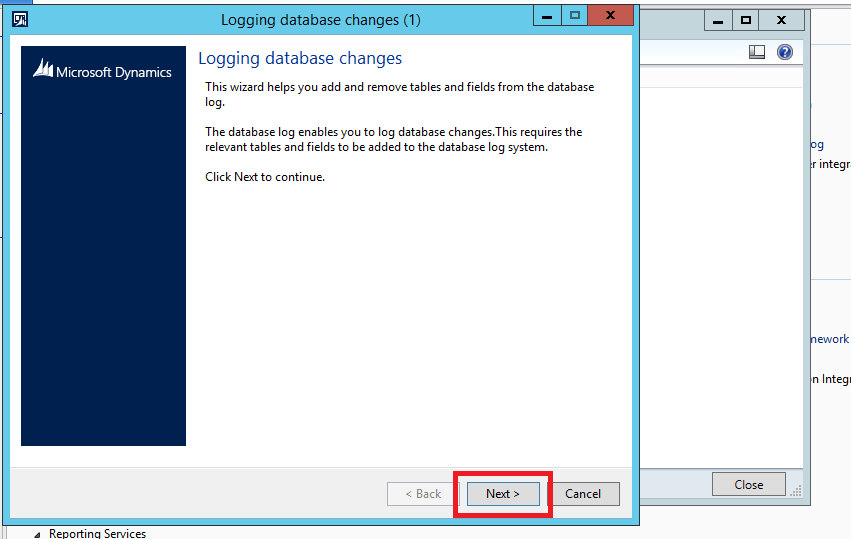
Step3: you will popup with wizard database logging -> Click on Next


Step4: select you table from here -> then click on Next


Step5: select tick in insert ,update, delete, according to you requirement. it is basically when        someone  insert , delete or update any record it will show in log. -> after that click on next


Step6: it will show how many tables you have selected and what command you have selected


once it done then check your select table in same place setup -> database-> database log setup
here you can find all changes which you have done.

now go to -> inquery-> database log (here you can check all the logs.


using X++ code for one table

Static Void aks_DBlogging(Args _args)
{
TableId tableId = tableNum(InventItemSalesSetup);
    DatabaseLog log;
    SysDictTable dictT = new SysDictTable(tableId);
    SysDictField dictF;
    Set fields;
    SetEnumerator   se;
    log.logType = DatabaseLogType::Update;
    log.logTable = tableId;
    fields = dictT.fields(false,false,true);
    se = fields.getEnumerator();
 
    while (se.moveNext())
    {
        dictF = se.current();
        log.logField = dictF.id();
        log.insert();
        info(strFmt("Adding field %1", dictF.name()));
    }
    SysFlushDatabaselogSetup::main();
}

using X++ code for All Table


static void aks_DBlogging(Args _args)
{
   tableId         tableId;
    int             tablecounter;
    DatabaseLog log;
    SysDictTable dictT;
    SysDictField dictF;
    Set fields;
    SetEnumerator   se;
    Dictionary      dict = new Dictionary();

    for (tablecounter=1; tablecounter<=dict.tableCnt(); tablecounter++)
    {
        tableId = dict.tableCnt2Id(tablecounter);

     // TableId tableId = tableNum(InventItemSalesSetup);

     dictT = new SysDictTable(tableId);

    log.logType = DatabaseLogType::Update;
    log.logTable = tableId;
    fields = dictT.fields(false,false,true);
    se = fields.getEnumerator();
    while (se.moveNext())
    {
        dictF = se.current();

        log.logField = dictF.id();
        log.insert();
        info(strFmt("Adding field %1", dictF.name()));
    }
    }
    SysFlushDatabaselogSetup::main();
 
}


Sunday, 30 July 2017

How to install GST HotFix in Ax 2009 and 2012R3


How to install GST HotFix in Ax 2009 and 2012R3.

1.       Download GST patch from given link.

3.       Download gst GA Release. According to you Ax.
4.       Also download GST configuration.
5.       Once you download extract that file.
6.       In ax 2012 r3 you will receive 3 files.
 DynamicsAX2012R3-KB4019353-App
DynamicsAX2012R3-KB4019353-Kernel
DynamicsAX2012R3-KB4019353-Retail_SDK_OnlineChannel.

·         Before installing anything remember stop that aos where you going to install GST.

7.       Now first open App, while opening App file it will extract  into seprate files and exe.
Run axupdate exe from application.
1.       Select language.
2.       Next.
3.       Accept and continua.
4.       Next it will ask for database where you want to gst update.
5.       Next it will chack conflict. Next.
6.       Now when it will start update, then it will take some time.

After installing application.
It is time to install kernel.
When you open kernel it will extract into seprate file and exe.
Now run the that exe.
After install this kernel patch.

Times to start compile.

Go to cmd and type this command (according to you ax path and AOS id) as administrator

"C:\Program Files\Microsoft Dynamics AX\60\Server\MSAX2012\bin>axbuild.exe xppcom
pileall /s=03"

then it will start compiling according to you server RAM, it will take time.
Once it done. Then you will see compiling complete massagae in cmd.
Then
Start your AOS.
And open your AX. Once you open it will give you massage.


the model store has been modified.
just


Skip this and check and GL module . here you will see all the update forms.

in setup -> sales tax -> india 

"as you know that this GST is application in GST then it will show in india only in tax."

Now generate full CIL and synchronize. And use gst accorging to functionality.  


if any one want help in functional of GST please let me know.


Thanks
akshay


Wednesday, 14 June 2017

Barcode in AX 2012 SSRS REPORT


Barcode in AX 2012 SSRS REPORT


Barcode report , I am going to use RDP. This is the basic code you can use in your code according to your requirement.


Step 1: create Temp Table


Step 2 : Now Create Contract Class For Parameter.


Steps 3 : create Data Process Class for Logic. And use temp table and logic


Then open VB and select project -> select report - > add datasets -> data source type -> RDP -> then select your  -> create DP Class.

Then add in design -> precision Design - > select you field -> then run-> take item in parameter field and run
Output :


Thanks

Akshay

Sunday, 14 May 2017

Getting Started With Power BI Desktop


Getting Started With Power BI Desktop: Installation


Today i am going to Talk about Power BI, i know it is too late but what to do, you know when you met with new technology and it is necessary learn that , then only you do, that's what i do.

so in this tutorial i am going Tell How Power BI works,

Remember : Power BI will not alow on personal account
you should sign in when you have work or office Account of Microsoft.

In my case i have Microsoft Account. so before doing anything make and account. in this case i m guessing you have a account.

Step 1 : download Microsoft Power BI Desktop from this link https://powerbi.microsoft.com/en-us/downloads/


Step 2 : once you download then install


Step 3 : Accept All Aggrement. Next


Step 4:  Choose the Location Where you want to Save , Next


Step 5: Now Click On Install


Step 6:  Lets Wait.


Step 7: Finally it is finished to use


Step 8 : Double click on the finished Power BI program to use.


Step 8: final step, it is look like this when all install

\


In the Second Part We Will Learn how to work on that.


Thanks

Akshay