Friday, 20 April 2018


Lookup Field using UIBuilder in SSRS report in ax 2012


Client want to see the report color wise but in report there is only item wise.
So I have  added color in selection which must be lookup


Then add one parameter to existing contract class


[
DataMemberAttribute("EcoResColorName"),
SysOperationDisplayOrderAttribute("4")

]


public EcoResColorName parmInventColorId(EcoResColorName _inventColorId = inventColorId)
{
    inventColorId = _inventColorId;

    return inventColorId;
}


For that I create UI builder class

name the class and extends SrsReportDataContractUIBuilder

public class Aks_SRCustomLookupsUIBuilder extends SrsReportDataContractUIBuilder
{

     BOMRDPContract    BOMRDPContract;
     ItemId  itemId;


}


public void build()
{
    int i;

    BOMRDPContract = this.dataContractObject();// as BOMRDPContract;
    this.addDialogField(methodStr(BOMRDPContract, paramItemId),BOMRDPContract);
    this.addDialogField(methodStr(BOMRDPContract, paramKgs),BOMRDPContract);
    this.addDialogField(methodStr(BOMRDPContract, paramQty),BOMRDPContract);

    this.addDialogField(methodStr(BOMRDPContract, parmInventColorId),BOMRDPContract);
}

public void postBuild()
{
     DialogField dlgBomid;
     DialogField dlgColorid;

    super();


    dlgColorid = this.bindInfo().getDialogField(this.dataContractObject(),methodStr(BOMRDPContract,parmInventColorId));

    dlgColorid.registerOverrideMethod(methodStr(FormStringControl, lookup),methodStr(GOD_SRCustomLookupsUIBuilder, BomIdLookUp),this);


}

private void BomIdLookUp(FormStringControl  _formStringControl)
{
    Query query = new Query();
    QueryBuildDataSource DS;
    SysTableLookup sysTablelookup;
    QueryBuildDataSource    queryBuildDataSourceLocal,queryBuildDataSourceLocal1,queryBuildDataSourceLocal2;
    //aks
    InventDimCombination inventDimCombination;
    InventDim                     inventDim;
    //aks

    //create a table lookup

   /* DS = query.addDataSource(tableNum(EcoResColor));
    sysTablelookup = SysTableLookup::newParameters(tableNum(EcoResColor), _formStringControl);
    sysTablelookup.addLookupfield(fieldNum(EcoResColor,Name));*/


    sysTablelookup = SysTableLookup::newParameters(tableNum(inventDim), _formStringControl);
    sysTablelookup.addLookupfield(fieldNum(inventDim,InventColorId));

    DS = query.addDataSource(tableNum(inventDim));
    DS = DS.addDataSource(inventDimCombination);

    DS.addLink(fieldNum(inventDim, InventDimId),fieldNum(inventDimCombination,InventDimId));

    DS.addRange(fieldNum(inventDimCombination,ItemId)).value(BOMRDPContract.paramItemId());
    //"1120132");

    //assign the query and call lookup
    sysTablelookup.parmQuery(query);
    sysTablelookup.performFormLookup();


}


Thanks
Akshay

Thursday, 19 April 2018


Condition between Date in ax 2012 using x++ 


Transdate   testDonedateTime ;
;

 testDonedateTime = DateTimeUtil::date(purchline.createdDateTime);
           
                if(AgreementLineQuantityCommitment.EffectiveDate <                  testDonedateTime//purchline.DeliveryDate
                && AgreementLineQuantityCommitment.ExpirationDate >testDonedateTime)
{
condition.....
}


Thanks
Akshay

Monday, 9 April 2018


Inventory Transfer Journal through Excel using X++ code in ax 2012

Hi,
This code is used to import Data from Excel. you can make excel according give sequence in below in code.


static void aks_CreateTransferJournal(Args _args)
{
    Dialog                      dialog;
    Filename                    filename;
    DialogField                 dialogFilename;
    //To filter the files while selecting
    container                   conFilter = ["Microsoft Excel 97-2003 Worksheet (.xls)" ,"*.xlsx"];
       SysExcelApplication                 application;
    SysExcelWorkbooks                   workbooks;
    SysExcelWorkbook                    workbook;
    SysExcelWorksheets                  worksheets;
    SysExcelWorksheet                   worksheet;
    SysExcelCells                       cells;
    COMVariantType                      type;
    int                                 row=1;
    ItemId                           itemId;
        InventJournalTable      journalTable;
    InventJournalTableData  journalTableData;
    InventJournalTrans      inventJournalTrans;
    InventDim               toInventDim,frominventDim;
    TransDate                   transDate;
    InventQtyJournal            inventQtyJournal;
    InventBatchId               inventBatchId, toinventBatchId;
    InventDimId                 inventDimId;
    InventSiteId                inventSiteId,toinventSiteId;
    WMSLocationId               wMSLocationId,towMSLocationId;
    InventLocationId            inventLocationId,toinventLocationId;
    ;
    application = SysExcelApplication::construct();
    workbooks = application.workbooks();
    dialog = new dialog();
    dialog.caption("select a file");
    //dialogFilename      =   dialog.addField(typeId(FilenameOpen));
    dialogFilename = dialog.addField(extendedTypeStr(FilenameOpen));
    //To filter the files while selecting
    dialog.filenameLookupFilter(conFilter);
    dialog.run();
    if(dialog.closedOk())
    {
        filename = dialogFileName.value();
    }
    try
    {
        workbooks.open(filename);
    }
    catch (Exception::Error)
    {
        throw error("File cannot be opened.");
    }
    workbook = workbooks.item(1);
    worksheets = workbook.worksheets();
    worksheet = worksheets.itemFromNum(1);
    cells = worksheet.cells();
    do
{
        row++;
                transDate                           = cells.item(row,1).value().date();
                itemId                             = cells.item(row,2).value().bStr();
                inventQtyJournal                    = cells.item(row,3).value().double();
               
                inventSiteId=  cells.item(row,4).value().bStr();
                inventLocationId =  cells.item(row,5).value().bStr();
                inventBatchId = cells.item(row,6).value().bStr();
                wMSLocationId = cells.item(row,7).value().bStr();
               
                toinventSiteId=  cells.item(row,8).value().bStr();
                toinventLocationId = cells.item(row,9).value().bStr();
                toinventBatchId = cells.item(row,10).value().bStr();
                towMSLocationId=  cells.item(row,11).value().bStr();
               
   
            Ttsbegin;


    inventJournalTrans.clear();
    inventJournalTrans.JournalId      = 'AKS-000021';
    inventJournalTrans.JournalType    = InventJournalType::Transfer;
    inventJournalTrans.TransDate      = transDate;
    inventJournalTrans.ItemId         = itemId;
    inventJournalTrans.Qty            = inventQtyJournal ;


    inventJournalTrans.initFromInventTable(InventTable::find(inventJournalTrans.ItemId), False, False);
   // Dimensions From which the transfer performs
    frominventDim.InventSiteId = inventSiteId;
    frominventDim.InventLocationId =inventLocationId;
    frominventDim.inventBatchId = inventBatchId;
    frominventDim.wMSLocationId = wMSLocationId;
    // Dimensions To which the transfer performs
    toInventDim.inventSiteId         = toinventSiteId;
    toInventDim.InventLocationId     =  toinventLocationId;
    toInventDim.inventBatchId = toinventBatchId;
    toInventDim.wMSLocationId = towMSLocationId;
    inventJournalTrans.InventDimId = InventDim::findOrCreate(frominventDim).inventDimId;
    inventJournalTrans.ToInventDimId = InventDim::findOrCreate(toInventDim).inventDimId;
    inventJournalTrans.insert();
   
ttsCommit;
              info(strfmt("%1",inventJournalTrans.ItemId));
        type = cells.item(row+1, 1).value().variantType();
        } while(type != COMVariantType::VT_EMPTY);


    workbooks.close();
    application.quit();
    info("Operation/Processing Completed");
}


Wednesday, 4 April 2018


Filter in form by value.


vendopentrans-> DS-> vendtransopen -> init

public void init()
{
    QueryBuildDataSource qbds;
    QueryBuildRange qbr;
    super();


    qbds = this.query().dataSourceTable(tableNum(VendTransOpen));
    qbds.sortClear();
    qbds.addSortField(fieldNum(VendTransOpen, Aks_OnHold));
    qbr = SysQuery::findOrCreateRange(qbds, fieldNum(VendTransOpen, Aks_OnHold));
    qbr.value(queryValue('No'));

}

Thursday, 15 February 2018

Send Email to Multiple Recipients(To multiple Emails Id ) in Ax 2012 using X++


Send Email to Multiple Recipients(To multiple Emails Id ) in Ax 2012 using X++


static void Aks_emailcheck(Args _args)
{

SysEmailParameters parameters = SysEmailParameters::find();
SMTPRelayServerName relayServer;
SMTPPortNumber          portNumber;
SMTPUserName             userName;
SMTPPassword               password;
Str1260                            subject,body;
InteropPermission           interopPermission;
SysMailer                        mailer;
System.Exception            e;
 Aks_MailTos                  Aks_MailTos;
 
List                                 emailAddresses;
ListEnumerator              enum;

;
if (parameters.SMTPRelayServerName)
relayServer = parameters.SMTPRelayServerName;
else
relayServer = parameters.SMTPServerIPAddress;
portNumber = parameters.SMTPPortNumber;
userName = parameters.SMTPUserName;
password = SysEmailParameters::password();
subject = "Subject line for the email";
body = "<B>Body of the email</B>";

CodeAccessPermission::revertAssert();

try
{
interopPermission = new InteropPermission(InteropKind::ComInterop);
interopPermission.assert();
mailer = new SysMailer();
mailer.SMTPRelayServer(relayServer,portNumber,userName,password, parameters.NTLM);
//instantiate email
mailer.fromAddress("akshaykupra@gmail.com");
 
select Aks_MailTos where Aks_MailTos.RecId == 5537144576;
// i took recid this becouse there must be one line which contain multiple mails id with ","
// like i took it in TosEmails fields
emailAddresses = SysEmailDistributor::splitEmail(Aks_MailTos.TosEmails);
enum = emailAddresses.getEnumerator();
while (enum.moveNext())
{
       mailer.tos().appendAddress(enum.current());
}
mailer.ccs().appendAddress("akshaykupra@gmail.com");
mailer.subject(subject);
mailer.htmlBody(body);
mailer.sendMail();
CodeAccessPermission::revertAssert();
info("Email has been send!");
}
catch (Exception::CLRError)

{
e = ClrInterop::getLastException();

while (e)

{
info(e.get_Message());

e = e.get_InnerException();
}
CodeAccessPermission::revertAssert();

info ("Failed to Send Email some Error occure");
}

}


Regards,
Akshay

Multiple action manu item call by single class action manu item


Multiple action manu item call by single class action manu item


Hi All,

This is very simple requirement, client wants one manu item will open code according to legal entity wise. there are three legal entity DEL<MUB<BAN.

you can use according to your requirement. so i created one class and one main Action manu item
i put my this class in new action manu and put it in front.


public static void main(Args _args)
{
    Aks_JVManuITem Aks_JVManuITem;
   MenuFunction menuFunction;

 
            if(curext()=="DEL")
            {

            menuFunction = new MenuFunction(menuitemActionStr(Aks_JVImport_DEL), MenuItemType::Action);
            menuFunction.run();
            }
            if(curext()=="BAN")
            {
            menuFunction = new MenuFunction(menuitemActionStr(Aks_JVImport_BAN), MenuItemType::Action);
            menuFunction.run();
            }
            if(curext()=="MUB")
            {
            menuFunction = new MenuFunction(menuitemActionStr(Aks_JVImport_MUB), MenuItemType::Action);
            menuFunction.run();
            }


}


Regards,
Akshay

Wednesday, 17 January 2018


How To Setup Database Log in AX 2012 using manually/using X++ Code for single Table/using X++ Code for all Table.

using Manually:
step1 :  select System Administration -> setup -> Database -> Database log Setup


Step2 : when you click you will see this -> click on new


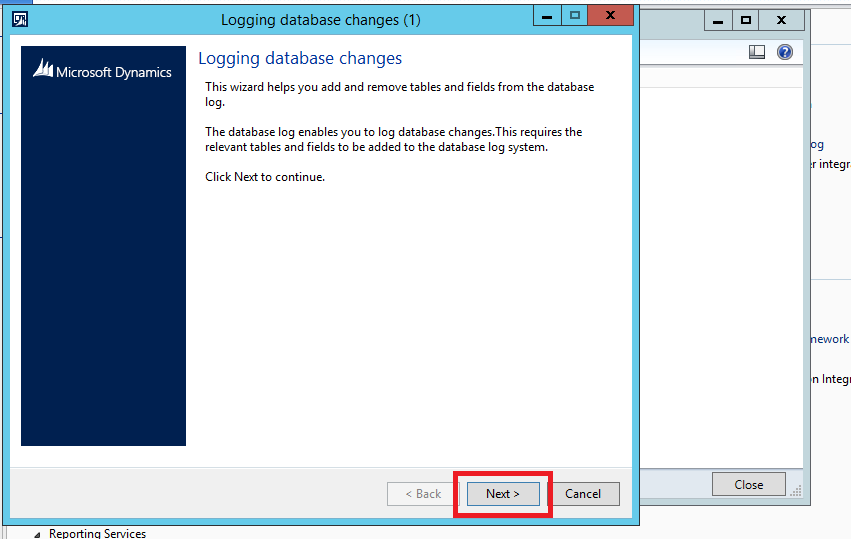
Step3: you will popup with wizard database logging -> Click on Next


Step4: select you table from here -> then click on Next


Step5: select tick in insert ,update, delete, according to you requirement. it is basically when        someone  insert , delete or update any record it will show in log. -> after that click on next


Step6: it will show how many tables you have selected and what command you have selected


once it done then check your select table in same place setup -> database-> database log setup
here you can find all changes which you have done.

now go to -> inquery-> database log (here you can check all the logs.


using X++ code for one table

Static Void aks_DBlogging(Args _args)
{
TableId tableId = tableNum(InventItemSalesSetup);
    DatabaseLog log;
    SysDictTable dictT = new SysDictTable(tableId);
    SysDictField dictF;
    Set fields;
    SetEnumerator   se;
    log.logType = DatabaseLogType::Update;
    log.logTable = tableId;
    fields = dictT.fields(false,false,true);
    se = fields.getEnumerator();
 
    while (se.moveNext())
    {
        dictF = se.current();
        log.logField = dictF.id();
        log.insert();
        info(strFmt("Adding field %1", dictF.name()));
    }
    SysFlushDatabaselogSetup::main();
}

using X++ code for All Table


static void aks_DBlogging(Args _args)
{
   tableId         tableId;
    int             tablecounter;
    DatabaseLog log;
    SysDictTable dictT;
    SysDictField dictF;
    Set fields;
    SetEnumerator   se;
    Dictionary      dict = new Dictionary();

    for (tablecounter=1; tablecounter<=dict.tableCnt(); tablecounter++)
    {
        tableId = dict.tableCnt2Id(tablecounter);

     // TableId tableId = tableNum(InventItemSalesSetup);

     dictT = new SysDictTable(tableId);

    log.logType = DatabaseLogType::Update;
    log.logTable = tableId;
    fields = dictT.fields(false,false,true);
    se = fields.getEnumerator();
    while (se.moveNext())
    {
        dictF = se.current();

        log.logField = dictF.id();
        log.insert();
        info(strFmt("Adding field %1", dictF.name()));
    }
    }
    SysFlushDatabaselogSetup::main();
 
}